Since the lock down began due to coronavirus, I’ve had to change the way I work and the way I interact with my team. I’ve found that some people have enjoyed the freedom and flexibility, whilst others have found it challenging and boring. Many are still struggling to adapt.
There are 5 key elements to brace through this period:
self-discipline
positive mindset
taking care of your health
developing a new life style and habits
Be proactive and stay connected with your colleagues and loved ones.
This post provides some tips to help those that are struggling with the change.
1. Re-create your daily timetable, merging your work and personal schedule
Taking charge of your schedule and deciding when you work seems pretty obvious. However many people are still trying to do it all, with the lack of child care making it incredibly challenging for many parents to maintain their strict 9-5.
You need to figure out when you can fit everything in for the day. Include your work commitments, personal tasks, family chores. By keeping a schedule you don’t need to maintain the mental load of figuring out what you should be doing and when. Make use of the eisenhower matrix I discussed in a previous post to help you prioritise.
Identify the most productive hours during the day and plan the most important tasks to get done during those hours. Personally I’m not much of a morning person and prefer to do any significant tasks in the afternoon. However I’ve found that my daughter tends to sleep through the morning, and if I get more things done at that time, I’ll be able to spend more time with her in the afternoon and evening when she is awake.
Changing our existing habits is one of the hardest things to do. Home was where you went to relax away from work, and now its followed you home! Mindapples has a great pdf on how to go about changing your habits.
2. Spend some effort to setup a proper home office
A good home office can really help you maintain focus on the task at hand. Try to separate your professional and personal areas by carving out the physical space, it may be as simple as a table in a quiet corner of a room, or for those fortunate enough to have the space an entire study area.
Invest in your equipment. Get a proper headset, so you don’t crane your neck on the phones. Especially if you have a lot of meetings in your diary. Buy a monitor, stop looking at your 13-inch laptop screen, it was great for travelling and occasional wfh, but for working for an extended period, maybe it makes sense to get something bigger.
You’ll be spending a lot more time at your desk, make sure you have a good desk chair and foot rest if needed, alternatively invest in a standing desk. All important choices in keeping a good posture.
3. Open and transparent communication with your team
In general most people are understanding and try to be more empathetic towards each other during this work from home period. Be open and honest with your manager and team members around any limitations and constraints you have when working from home. So that they can help support you to be as productive and efficient as possible.
As a manager my one to ones feel like they have taken on even more significance. Without being able to take body language into account, assessing colleagues mental health as well as physical health is even more challenging. Don’t be afraid to explicitly ask them how they are feeling about the situation and if there is anything you can do to help. Quite often just speaking about problems can be enough.
One of our teams has adopted virtual coffee point times in the day and setup zoom calls for colleagues to meet up and talk. Topics have ranged from what is your work setup, to what is in your fridge. This could be a great opportunity to learn more about your colleagues, and to bond as a team.
4. Adopting a positive mindset, with positive distractions
Think about some of the things you have been longing to do when you have the time at home, now you have the chance, take action!
For me personally, I’ve been wanting to start a blog for many years, without a daily commute and with family to help with my daughter. I have sufficient time to write a few posts. I am also incredibly grateful to be able to spend much more time than I expected with my daughter at this age.
Try to see some of the positives this change in lifestyle has brought to you, it may even shift your values/beliefs, such that you may want to start thinking how you can maintain or enhance those positive impacts long after covid 19.
5. Take regular breaks and get some fresh air
Make sure you block your calendar and set some time to relax, refresh and recharge. Especially as you don’t have your normal lunch breaks. It is so easy to pop into the kitchen and grab a bite as you continue to work. Get up, stretch your legs, maybe try this 5-minute home office workout from Nuffield Health.
It can be easy for your workday and personal life to blur when your commute moves from 50 miles to 5 metres. Our commute gives us an opportunity to prepare for work or home life, and that context switch time has now all but disappeared. Some of my friends have found it helpful to have a different routine for those commute times. Such as taking kids for a walk or doing some exercise before you start your work day or home life.
So I spent Thursday at XT26 over at Tower Hill, and I’m finally getting round to writing it up — coffee in hand, brain still slightly fried from the day. If you haven't come across XT26 before, it's a one-day conference put on by JUXT, aimed squarely at engineers working in financial services. It was easily worth the trip, and the through-line across the day was so consistent that I wanted to get my thoughts down before they faded.
The short version: not every talk was about AI, but the ones that were kept circling the same things. How do you actually use it effectively? How do you work out whether you can trust it? And the dawning realisation that it doesn’t so much create new problems as amplify the ones we already had — governance, hiring, productivity measurement, the cost of putting anything into production. Nobody had tidy answers, and I think that’s the honest place to be right now.
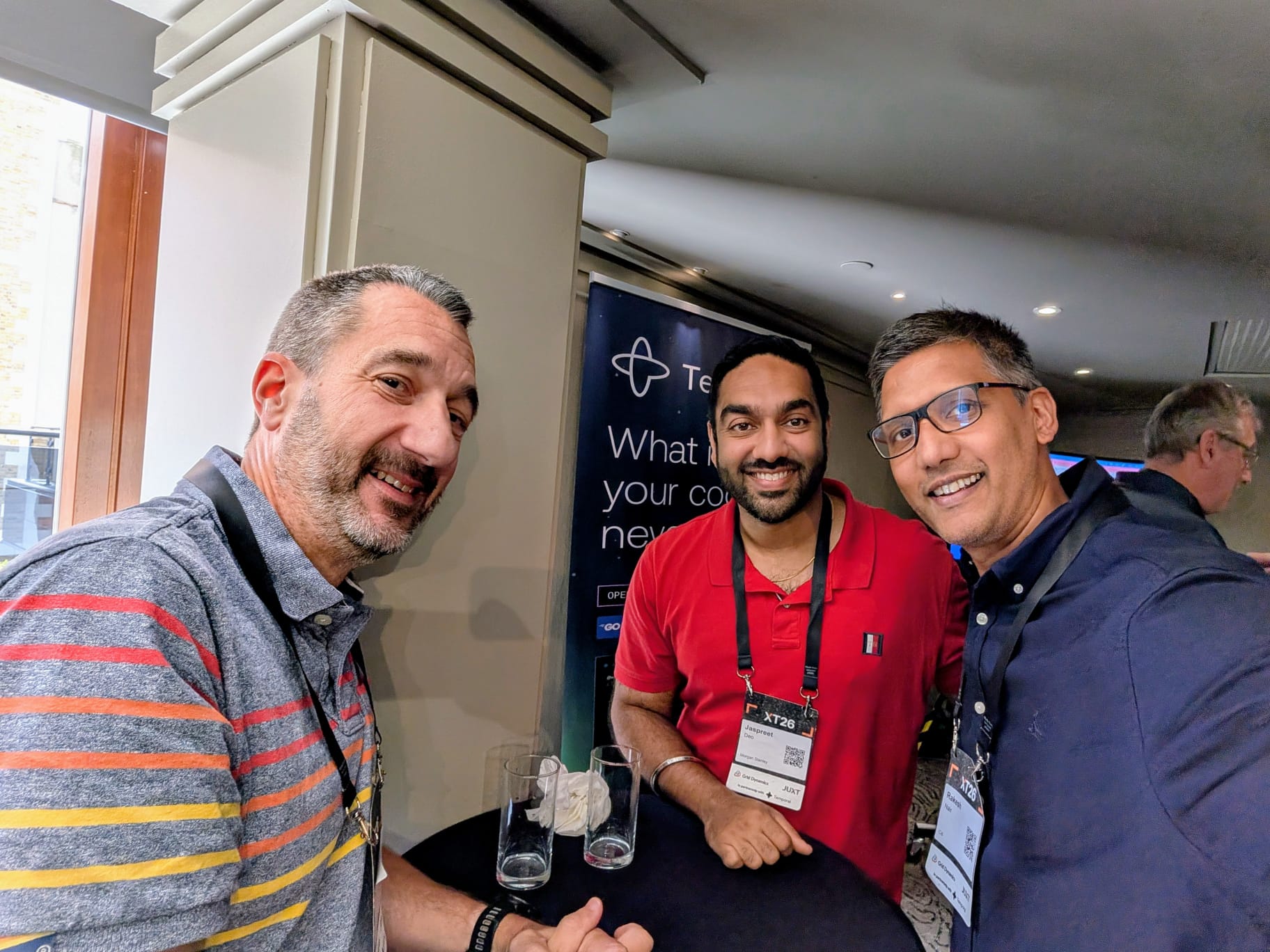
It was lovely to catch up with my manager Chris Perry and an ex-Morgan Stanley colleague of mine, Rakesh Nair, who I hadn't seen in ages. Half the value of a conference like this is the chats in between the talks, and this was no exception.
AI in equities — the promise is real, so are the problems
The first talk I caught was Will Bassett from HSBC, who runs equities and cross-asset financing tech. He's got something like 1,200 engineers under him, so when he says something's working or not working, it carries a bit of weight. His framing was that the capability of agentic coding tools has genuinely moved — that bit isn't hype — but the gap between what the tools can do in a demo and what an enterprise can safely roll out is huge. Governance, cost, security, vendor relationships, training, hiring. None of those bits are sexy, none of them are solved.
The graduate-hiring question landed hard for me. If juniors aren't writing the easy code any more, where do the next generation of senior engineers come from? Nobody in the room had a good answer, and I don't think we should pretend that we do.
Close to the metal — modern low-latency development
Tom Dellmann from Chronicle Software gave a properly old-school talk on low-latency systems, and after a morning of AI strategy this was a lovely palate cleanser. His core message was that low-latency engineering is about thinking in percentiles, not averages. Your p50 looks fine and your p99 is eating your lunch. It's tail latency that costs you money.
He went deep on the stuff you don't normally hear at conferences any more — serialisation tradeoffs, off-heap memory, eliminating garbage collection, CPU pinning, kernel tuning. Memory really does have to be treated as a first-class concern. But the bit I keep coming back to is actually a sideways thought. A lot of the reason firms still build these systems on the JVM is just skillset — Java is what people already know, what's easy to hire for, what the existing codebases are written in. With AI in the mix, that calculus might genuinely change. We could finally start picking the right tool for the job — Rust for this bit, something else for that bit — rather than defaulting to whatever language the team is most comfortable with. That feels like a genuinely interesting unlock, and one I hadn't really considered before Tom's talk pushed me to think about it.
Spectroscopy for software
Henry Garner, JUXT's CTO, gave one of those talks where I scribbled half a page of notes and then stopped writing because I just wanted to listen. Early on he referenced the METR study, where developers using AI assistants reported feeling around 20% more productive but were measured as being roughly 19% slower. It's the kind of result that makes you stop and check your own assumptions about how much the tooling is actually helping.
His real argument, though, was about legacy code. He defined legacy code as code that nobody has a theory of any more, which is a definition I want to steal. He drew a line back through Peter Naur's old "Programming as Theory Building" essay and forward to the question of whether AI can help us recover a theory of a system from the code itself — a sort of spectroscopy for software, where the model gives you a new representation of the thing you're already running.
A big part of the talk was Allium, an open-source tool JUXT have been working on that puts that idea into practice. The bit that really got me was when Henry showed it being used on the Apollo Guidance Computer source code — yes, that Apollo — and it surfaced a bug nobody had spotted. I thought that was a brilliant example, and honestly a pretty cool way to demonstrate what the tool can do.
Platform as a product in a 300-year-old bank
Abby Bangser from Syntasso and Joel King from NatWest took us through what it actually looks like to introduce internal platforms in a bank founded in 1727. They had 135 different deployment patterns across the bank at one point. One hundred and thirty-five. The mental image of that alone made me laugh and then wince.
Their journey was the now-familiar one — centralised ops to a DevOps free-for-all to a more grown-up platform-engineering model — but Joel was refreshingly honest about how long it actually takes, and how much of the work isn't technical at all. Getting a new application deployed used to take 8 to 12 weeks. They've got it down to less than an hour. That's the kind of number that changes how a business behaves. Abby's broader point, drawn from her work on the CNCF platform engineering whitepaper, was that the platform itself has to be treated as a product, with users, a roadmap, and a feedback loop — not as a side-of-desk infrastructure project.
Why coding agents fail to boost productivity
Nik Tkachev from JetBrains had the unenviable job of being honest about why agentic coding hasn't translated into the productivity numbers everybody hoped for. His answer was uncomfortably good. The gains are real but marginal at the individual level; the costs, on the other hand, are visible and rising — per-developer pricing has gone from something you didn't notice to something a department lead has to justify.
The bit that landed for me was his point about "in-thinking" time. When you're driving an agent rather than writing code yourself, you're spending your attention budget evaluating its output, deciding whether to accept, reviewing diffs. That isn't free, and at the moment we're not even measuring it properly. His advice was evolutionary, not revolutionary — start with autocomplete, move to multi-step, only then think about full automation. Skip the steps and you build distrust faster than you build value.
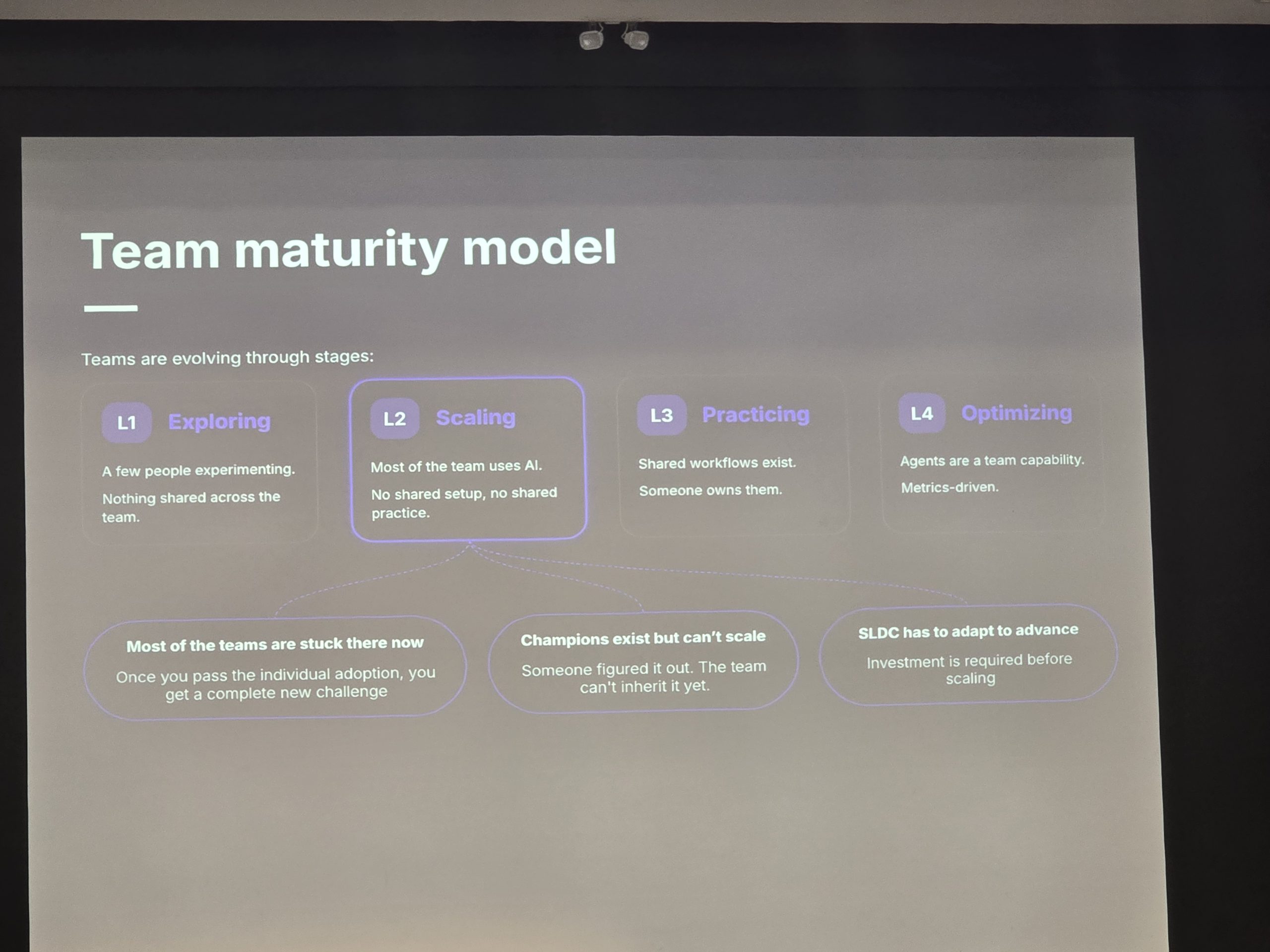
The slide above stuck with me. Nik laid out a team maturity model — L1 Exploring (a few individuals experimenting), L2 Scaling (most of the team uses AI but there's no shared setup and no shared practice), L3 Practicing (shared workflows, someone owns them), L4 Optimising (agents as a team capability, metrics-driven). His point was that most teams, including a lot of pretty serious ones, are stuck at L2 right now. Honestly, my own team is somewhere in that L2 bucket too. Everyone's using something, no two people are using it the same way, and we're trying to figure out how to get to L3 without burning everyone out in the process. It was oddly reassuring to see that drawn out on a screen and realise we're not alone.
Extracting reliable software from LLM loops
River Keefer from Antithesis made what I thought was the most quietly radical case of the day. Property-based testing — the idea you write a spec describing what should be true across a whole family of inputs, rather than picking a handful of examples — turns out to be a really good way of catching the things LLMs get subtly wrong.
He showed a lovely example where he asked a model for a bin-packing algorithm, was given a clever first-fit approximation, and only realised it wasn't an exact solution when his property-based test failed on a generated input. He paraphrased Dijkstra's 1978 essay on the "foolishness of natural language programming" — and honestly, watching a packed room nodding along to a 47-year-old paper was its own kind of moment.
Dark modules, cobots, and architecting for AI
Sam Newman closed out the bit of the day I saw, and honestly he was the highlight for me. Great stage presence, a real personality up there, and the kind of speaker who can land a serious point with a one-liner. If you ever get the chance to see him live, take it.
His framing was that we keep talking about AI as a uniform thing — either you let it write all the code or you don't — when actually the more sensible question is which modules of your system you let it own. He borrowed from robotics. Industrial robots work behind a cage, alone, dangerous, fast. Cobots work alongside humans, slower, safer, collaborative. The argument was that the same range applies to AI in our codebases — some modules can be "dark factories" where the AI runs unsupervised, others want a surgical cobot relationship where you're working hand in glove, and some you keep as straight human work.
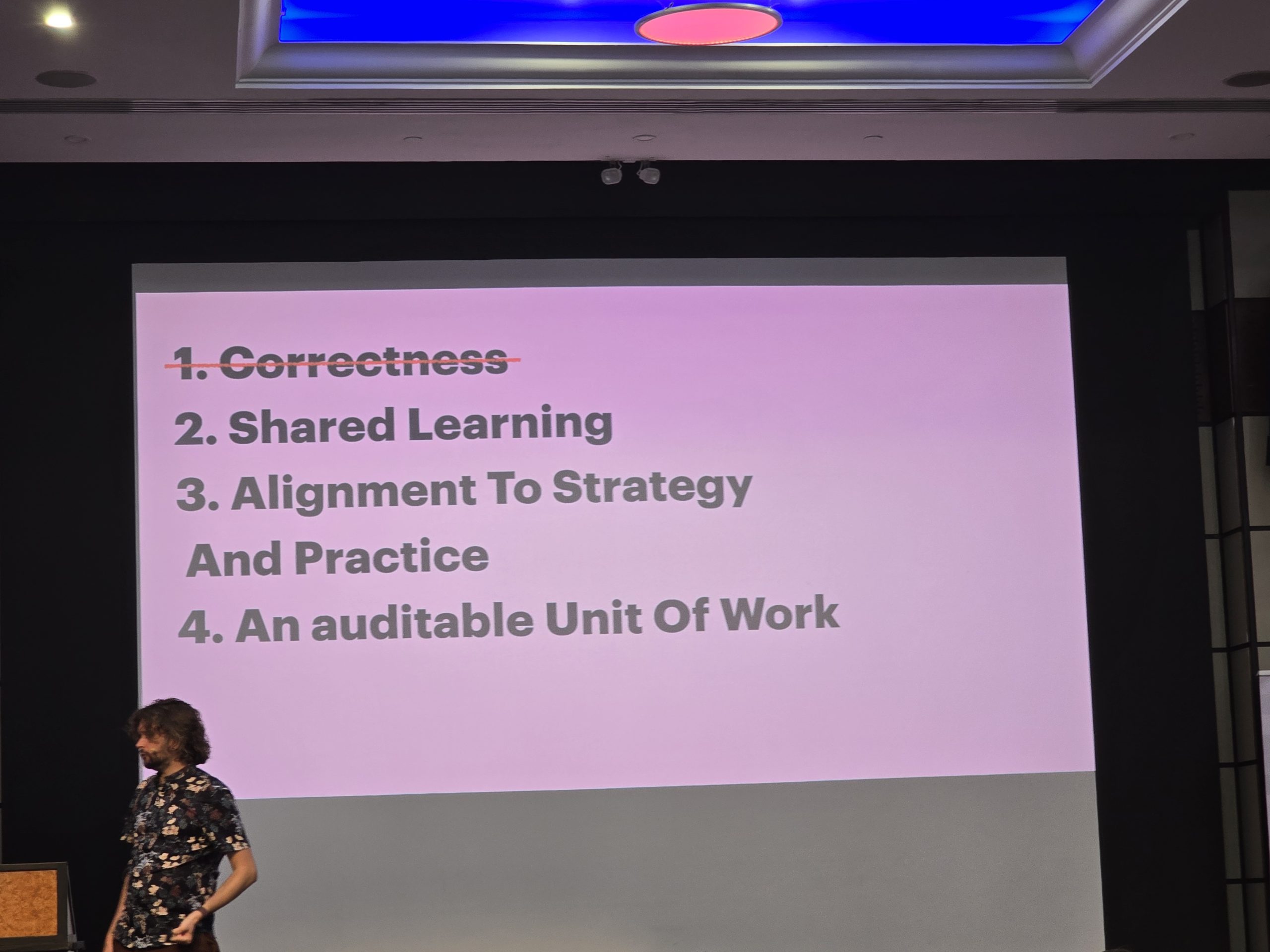
The bit I really enjoyed was when he turned his eye on the humble pull request. We've all been doing PRs for so long that we barely question them any more, but he actually went back to first principles and asked: what are PRs for? He listed four reasons.
Correctness, which is really a job for your tests rather than a code review. Shared learning, where reviewer and author both pick up something. Alignment to strategy and practice, making sure the code fits the wider direction of travel. And an auditable unit of work, which is genuinely important for compliance and traceability. The question he then put to the room was the awkward one. If a chunk of your code was written by an AI, which of those four still apply? The AI isn't learning in the human sense. The auditability is still useful. The alignment is on you. So is the PR process you're running over AI-generated code actually serving any of those purposes, or are you just performing the ritual? I genuinely don't know what the answer is for my own work yet, but I haven't been able to stop chewing on the question since.
Modular architecture, he argued, is the best hedge we've got against not knowing how this all plays out. The maturity that matters isn't your tooling — it's your team's ability to think critically about what you're actually doing.
What I came away with
If there was a single thread tying the day together, it was this. The interesting questions about AI in software aren't about what the models can do — they can do a lot, and the rest will improve. The interesting questions are about us. How we govern it, how we cost it, how we measure productivity honestly, how we structure our systems so the bits we want humans on stay with humans. Almost every speaker, in their own way, was making a case for clearer thinking and better boundaries rather than for raw acceleration.
I'd love to hear how other people are dealing with this where they work. Are your teams seeing real productivity wins from agentic tools, or are you stuck in the same evaluation purgatory the rest of us seem to be in? Drop me a comment below — I'd genuinely like to compare notes.
A personal reference, written after spending a couple of days digging into local LLMs from first principles.
Most explanations of “how AI works” stop at the level of the model itself — a black box that takes text in and produces text out. But once you actually try to run one yourself, you quickly discover that “the model” is only one layer of a much taller stack. Every product you’ve used — ChatGPT, Claude, Cursor, Character.AI, GitHub Copilot — is built from the same handful of layers. Once you can name those layers, the entire ecosystem becomes navigable.
This post is my reference for those layers, plus the key technical concepts that show up inside them.
AI Systems Are Layered
A working AI product like Claude Code or ChatGPT is not a single piece of software. It’s at least four distinct layers stacked on top of each other, each with its own job:
Layer
Role
Example
Model
The trained weights — billions of numbers
Llama 3.1, Qwen 2.5, Mistral, Claude Opus
Inference engine
Loads the model and runs the math
Ollama, vLLM, llama.cpp, TensorRT-LLM
Orchestrator
Manages context, memory, personas, history
Open WebUI, LangChain, LlamaIndex
Agent
Lets the model take actions in the real world
Claude Code, Goose, Cline, Aider
Each layer expands the system’s reach. The model knows things. The engine makes it run. The orchestrator gives it situational awareness. The agent gives it hands.
Here’s how the layers stack together in practice — what flows between them, and where the boundaries are:
┌───────────────────────────────────────────────────────────┐
│                          USER                             │
│              "read my file and summarize it"              │
└─────────────────────────────┬─────────────────────────────┘
                              │
                              ▼
┌───────────────────────────────────────────────────────────┐
│  AGENT             Claude Code · Goose · Cline · Aider    │
│  ───────────────────────────────────────────────────────  │
│  Defines tools and executes real-world side effects:      │
│    • read_file, write_file, run_shell, http_request       │
│  Parses tool calls from model output and runs them.       │
└─────────────────────────────┬─────────────────────────────┘
                              │  builds tool-aware prompt
                              ▼
┌───────────────────────────────────────────────────────────┐
│  ORCHESTRATOR      Open WebUI · LangChain · LlamaIndex    │
│  ───────────────────────────────────────────────────────  │
│  Constructs the full prompt for every turn:               │
│    • Chat history    • Persona / character card           │
│    • Summaries       • RAG (vector retrieval)             │
│    • World info      • Sampler presets                    │
└─────────────────────────────┬─────────────────────────────┘
                              │  HTTP request with prompt
                              ▼
┌───────────────────────────────────────────────────────────┐
│  INFERENCE ENGINE  Ollama · vLLM · llama.cpp · TensorRT   │
│  ───────────────────────────────────────────────────────  │
│  Loads weights into VRAM, runs the math:                  │
│    • Tokenize input          • Run forward pass           │
│    • Manage KV cache         • Sample next token          │
│    • Stream tokens back      • Batch concurrent requests  │
└─────────────────────────────┬─────────────────────────────┘
                              │  tensor math on GPU
                              ▼
┌───────────────────────────────────────────────────────────┐
│  MODEL             Llama 3.1 · Qwen 2.5 · Mistral · GPT   │
│  ───────────────────────────────────────────────────────  │
│  Static weight tensors on disk. Given input tokens,       │
│  emits a probability distribution over the next token.    │
│  Data, not code. Knows nothing about you or the world.    │
└───────────────────────────────────────────────────────────┘
Read it bottom-up to see capability growing: raw probabilities become a running computation, become a contextualized conversation, become an actor in the world. Read it top-down to see how your intent gets translated all the way down to tensor multiplies on a GPU.
Most confusion in the AI ecosystem comes from treating these as one thing. They’re not.
Layer 1: The Model
A model is a collection of weight tensors — typically billions of numbers organized across 30–80 transformer layers — plus a small tokenizer that converts text to and from integer token IDs.
It is a static file on disk until someone loads it. You can copy it to a USB drive, checksum it, delete it. It is data, not code. It can’t run any more than a JPEG can display itself.
Given a sequence of tokens as input, its only job is to compute a probability distribution over its entire vocabulary (usually 32,000–128,000 possible tokens) representing how likely each one is to come next.
That’s it. At each step, the model produces probabilities; the inference engine’s sampler picks the actual next token. “Reasoning” models (like OpenAI’s o-series or DeepSeek-R1) complicate this picture slightly — they’re trained to generate long internal chains of thought before answering — but the underlying mechanic is still the same loop: predict probabilities, sample a token, append, repeat.
Layer 2: The Inference Engine
The inference engine is the program that loads the model into memory and actually runs the math. Specifically, it:
Loads weights from disk into RAM or VRAM
Tokenizes input text into integer IDs
Runs the forward pass — billions of multiply-accumulates per token across every layer
Manages the KV cache (the running attention state that makes generation fast)
Samples a token from the probability distribution the model emits
Streams results back to the caller
Optionally exposes an HTTP API and batches multiple requests for throughput
The model is the recipe. The engine is what cooks.
The major engines you’ll encounter:
llama.cpp — the grandfather of consumer inference. Runs everywhere (CPU, NVIDIA, AMD, Apple Silicon). The foundation under Ollama and LM Studio.
Ollama — llama.cpp wrapped in a daemon with a CLI, model library, and HTTP API. The standard for casual local use.
vLLM — production-grade serving for open-source models. PagedAttention, continuous batching. What you use when you have many concurrent users.
TensorRT-LLM — NVIDIA’s hyper-optimized engine. Squeezes maximum throughput at the cost of setup complexity.
MLX — Apple’s native ML framework. Fastest on Apple Silicon thanks to unified memory.
The same model file can run on multiple engines. The same engine can run many models. They’re independent.
Layer 3: The Orchestrator
The orchestrator sits between the user and the inference engine. It’s responsible for managing the persistent context the model itself lacks.
A raw model has no memory. Every request starts from scratch. The orchestrator’s job is to construct a rich, layered prompt for every turn so the model can behave as if it has memory, personality, and situational awareness.
Things an orchestrator does:
Maintains chat history
Injects character cards or persona definitions as system prompts
Generates and updates automatic summaries of long conversations
Performs vector retrieval (RAG) over past messages for semantic memory
Pulls in world info or lorebook entries when keywords appear
Examples: Open WebUI (a ChatGPT-like web UI for Ollama), LangChain and LlamaIndex (programmatic frameworks for building orchestrated pipelines), AnythingLLM (desktop app for chatting with your documents).
Crucially: an orchestrator does not take actions in the world. It can’t read your files, run shell commands, or hit external APIs. It just stage-manages the prompt.
This is also called context engineering — increasingly recognized as a distinct discipline from prompt engineering (writing better individual prompts) and from agent design (giving models tools).
Layer 4: The Agent
An agent is everything an orchestrator is, plus the ability for the model to take real-world actions through tools.
The mechanism, made concrete:
The agent injects a system prompt describing available tools and their schemas
The model emits a specially-formatted output recognized as a tool call — typically JSON like {"tool": "read_file", "args": {"path": "/tmp/x.txt"}}
The agent parses this, recognizes it as a tool request rather than user-facing text, and executes the actual action (calls a function, runs a command, hits an API)
The result of the action gets fed back into the conversation as the next message
The model continues with the new information
Tools aren’t a magical ability the model has — they’re a convention between the agent and the model. The model just produces text; the agent recognizes some of that text as tool calls and acts on it.
MCP (Model Context Protocol) is one standardized way to define and serve tools to agents. It’s a protocol, not the only way function calling can work. It’s to tools what HTTP is to web servers — a standard, not a requirement.
Examples of agents: Claude Code, Goose (Block), Cline (VS Code extension), Aider (terminal coding agent), Continue.dev, OpenHands.
The defining property of an agent is that the model’s output can cause real-world side effects. That’s the line.
The agent and orchestrator layers together — the tool loop, the prompt assembly, the execution sandbox, the surrounding scaffolding that turns a raw model into a working system — are often called the harness. When people say “Claude Code is a harness around Claude,” this is what they mean: everything outside the model weights that makes the model usable as an actor. The model is the engine; the harness is the car around it.
Additional Components
The four-layer model is the minimum useful taxonomy. A few more components live inside or alongside those layers:
Tokenizer — converts text ↔ tokens. Bundled with the model. Different models have different tokenizers.
LoRA / fine-tune adapters — small extra weight matrices (10–100 MB) that modify a base model’s behavior without retraining the whole thing.
Quantization — a transformation of weights that compresses them from 16-bit floats to 4-bit, 5-bit, or 8-bit integers. Smaller and faster, with a small quality cost.
Embedding model — a separate, much smaller model used purely to convert text into vectors. Powers semantic memory in orchestrators and RAG systems.
Caching layer — prompt caching stores intermediate computation for repeated prompt prefixes. Reduces cost and latency.
Routing layer — LiteLLM, OpenRouter. Lets one app talk to many models through one interface.
Observability layer — Langfuse, Helicone. Logs every model call for debugging and cost tracking.
Application / UI layer — what the user actually interacts with. Claude Code is the CLI wrapping the agent. Cursor is an editor wrapping it. ChatGPT is a web UI wrapping its agent.
Here’s the expanded picture, with all of those components slotted into the four-layer stack — plus the hardware they ultimately run on:
Every AI product on the market is some subset of this stack. ChatGPT hides everything below the UI from you. Ollama exposes the inference engine and model. Open WebUI adds the orchestrator on top. Claude Code wraps an agent around the whole thing. Same building blocks, different combinations.
Key Concepts
These are the technical terms that appear constantly once you start reading deeper.
Tokens
Tokens are subword pieces, not words. “Unhappiness” might be three tokens: un, happy, ness. The model’s vocabulary contains ~32k–128k unique tokens. Every input and output is a sequence of token IDs. Context length, pricing, and the KV cache are all measured in tokens.
Tensors
A tensor is a multi-dimensional array of numbers — the generalization of a number.
A scalar is 0-dimensional: 7
A vector is 1-dimensional: [1, 2, 3]
A matrix is 2-dimensional: [[1,2],[3,4]]
A tensor is the general term for any number of dimensions
Model weights are tensors. Activations flowing through the network are tensors. The KV cache is a tensor. NVIDIA’s Tensor Cores are specialized GPU hardware for multiplying tensors in parallel — the reason inference runs on GPUs, not CPUs.
KV Cache
In a transformer, every token “attends to” every previous token. For each token, the model computes three things: Query (Q), Key (K), and Value (V).
When generating token 501, the model needs Q for token 501, plus K and V for tokens 1–500. The K and V values for previous tokens never change once computed — they’re properties of those tokens.
The KV cache stores those K and V values so they don’t have to be recomputed every step. This trades VRAM for compute: without it, generating each new token would re-do the work for every prior token (O(n) per step, O(n²) total to produce n tokens). With the cache, each new step only does O(1) of the attention work for prior tokens, bringing total generation cost down to O(n). Without it, local LLMs would be unusably slow.
The cache grows linearly with context length. For a 12B model at 32k context, the KV cache alone can occupy 5+ GB of VRAM. This is why doubling your context length roughly doubles VRAM usage even though the model itself doesn’t change.
Quantization
Original model weights are stored as 16-bit floating point numbers (FP16 or BF16). Quantization compresses them to fewer bits — typically 4-bit (Q4), 5-bit (Q5), or 8-bit (Q8) integers. A Q4 quantized model is roughly one quarter the size of the original, with a small but measurable quality loss.
Common quantization tags: Q4_K_M (4-bit, balanced quality), Q5_K_M (5-bit, slightly better), Q8_0 (8-bit, near-original quality). For most use cases, Q4_K_M or Q5_K_M is the sweet spot.
Embeddings
An embedding is a fixed-size vector of numbers (typically 384, 768, or 1024 dimensions) that represents the meaning of a piece of text. Sentences with similar meanings get vectors close together; sentences with different meanings get vectors far apart.
Embeddings are produced by small, specialized models (nomic-embed-text, mxbai-embed-large, OpenAI’s text-embedding-3-*). They power semantic search, RAG, and most “AI memory” features. Every modern AI system that “remembers” you uses embeddings under the hood.
GQA (Grouped Query Attention)
Modern models like Llama 3, Mistral Nemo, and Qwen 2.5 use Grouped Query Attention — many query heads share fewer K and V heads. This dramatically shrinks the KV cache (often 4× smaller) and is the reason mid-sized models can support long contexts on consumer GPUs.
Mental Model Summary
A way to remember the layers:
Model = “what to think” (the trained reasoning)
Engine = “how to think” (the computation that produces tokens)
Orchestrator = “what to think about” (context, memory, persona)
Agent = “what to do” (actions in the world)
A useful test for distinguishing them:
Has tools that affect the world? → agent
Has rich context management but no tools? → orchestrator
Just a UI on top of a model? → frontend
Just the API? → raw inference
Most “AI agents” in marketing materials are actually orchestrators. Most “AI assistants” are frontends. Real agents — the kind that can read your files, run commands, and modify the world — are the harder, rarer category, because giving a model the ability to act requires solving safety, reliability, and reasoning problems that orchestration sidesteps.
Mapping Real Products to the Stack
Once you internalize the four-layer model, every AI product you encounter slots into it cleanly:
Cursor = frontend (editor UI) + agent (tool loop over your codebase) + orchestrator (context retrieval, file indexing) + engine (a mix of Anthropic, OpenAI, and self-hosted serving) + model (Claude, GPT, or your choice)
An Open WebUI + Ollama setup at home = exactly the same architecture as a hosted assistant, just at hobbyist scale and entirely on your own hardware
The architecture is identical across consumer products, hobbyist setups, and frontier labs. What varies is the scale, the polish, and which components are proprietary.
This is why local LLMs are worth learning even if you mostly use cloud models. The mental model transfers entirely. Once you’ve watched Ollama load a model, seen an orchestrator construct a prompt from scratch, and felt the difference an agent loop makes — every AI product becomes a familiar pattern of components you already understand.
Once you can name the layers, you can take apart any AI product in your head — and that’s the real point.
Reference compiled from a week of hands-on experimentation with local inference engines, open-weight models, and a series of conversations debugging my own setup. The architecture described here is the same whether you’re running a 14B model on a gaming PC or serving frontier models to millions of users — only the implementation details change.
Have you ever felt like there is never enough time in the day to do all the things you want to do.
One technique that I’ve found particularly helpful, from a time management and prioritisation perspective, has been to bucket anything someone is asking me to do into one of the four categories in the Eisenhower Matrix.
This video does a great job explaining the technique in just two minutes.
Dwight D. Eisenhower, 34th president of the USA, made this method famous with the quote “I have two kinds of problems, the urgent and the important. The urgent are not important, and the important are never urgent.” The president attributed the technique to a former college president.
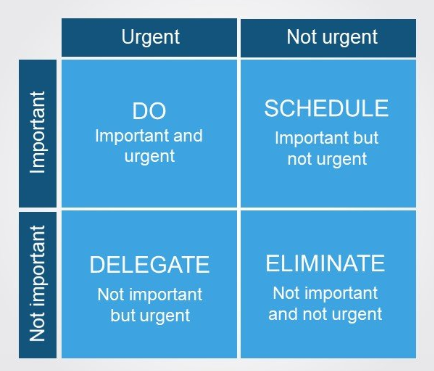
The Eisenhower matrix has the four quadrants below, it uses two axis. Urgent and Important.
Hopefully the quadrants are relatively self-explanatory, so I’m going to focus on how I make use of this matrix, and I would love to hear how other people have used this or other techniques to make themselves more productive in the comments below.
I maintain two of these matrices. I keep one for work and one for my private life. I find this really helpful to switch between work priorities and life priorities.
In practical terms my work list is nothing more than a notepad file with the headings of the different quadrants, and a small list under each heading. Nothing more complicated than that. However the hardest bit, that requires a bit of self-discipline when you start using this technique; is to write a task someone gives you into your list rather than just cracking on with whatever you’ve been asked to do.
I find just writing down the different things people have asked me to do, really helps to alleviate stress, as I’m no longer having to keep a mental track record of everything.
But writing things down first can be really tricky, as starting the task straight away can be really, really tempting. However, if you take a minute, take a step back; breathe and think about the bigger picture, it will really help to prioritise and manage your time effectively.
Do
In practice I’ve found trying to keep the “DO” list small is more realistic. In reality you won’t have 10 things going in parallel, that you are “doing”. I try to keep this list to around 5 items. They can be small in size like schedule meeting with a client, or larger items, like review a design of a system feature. They will be things that have a clear end goal/state. It can be really satisfying to see how many of these items you complete in a day.
At home a typical item that will go straight into this bucket could be change the baby’s smelly nappy, but only if I can’t delegate it away to my lovely wife!
Schedule
My schedule list tends to be twice as long as my “DO” list, and you’ll often find items that never get scheduled will move to your “ELIMINATE” list. To avoid these tasks becoming stale, I find it helpful to note down a target end date for the item, so I know how much time I have to figure out when to slot the item in. Scheduling time to write any blog posts, or design documents is a great example of things that are important to me, but are often not very urgent.
Delegate
One of the first things I had to learn as I moved into a leadership role, was learning how to delegate. It’s very tempting to do everything yourself, because no one can do it as well as you! Don’t let perfect be the enemy of the good. You don’t have the time to do everything yourself.
You’ll find you do some of this naturally at home with your family or partner. Who is responsible for the washing up, cleaning, grocery shopping? All the house hold chores are either things you are scheduling or delegating.
Eliminate
As I mentioned above there will be times when tasks move from one quadrant to another. Tasks that fall into this bucket are my favourite, as it means I don’t have to spend any more mental effort thinking or doing that task.
However another way to think about this quadrant is to improve your own productivity. How much time do you spend that isn’t focused on one of your goals? I loved playing video games, and I still find them fun to play with friends, but the time I spend playing them has significantly reduced over the years. Especially when playing alone, as I realised it wasn’t that important for me to complete the latest grand theft auto game.
Summary
I won’t claim that I’ve never incorrectly categorised a task. It does happen, so forgive yourself and just try to learn from it. There is always the temptation to do the simple or fun stuff first, and sometimes when you need a break that might be just what you need before you get back to the urgent and important list.
Time to relax and re-charge your batteries can be just as important as your “Do” list at work or home. Finding the balance is the key; and something that I continue to search for every day.
A journey of a thousand miles must begin with a single step
Be yourself; Everyone else is already taken.
— Oscar Wilde.
Long-form technical notes on programming and finance — the two areas I’ve spent the last decade working across. The posts here are written as reference material: architectural overviews, mental models, and walkthroughs documented clearly enough that I (or anyone else) can return later and pick up the context fast.
Topics span software engineering, financial systems, and where the two overlap.